


Clinics have the option to automatically release lab results to patient accounts as soon as they become available, without requiring prior provider sign off. This gives patients faster access to their health information and reduces what may be perceived as "information blocking".
Navigation
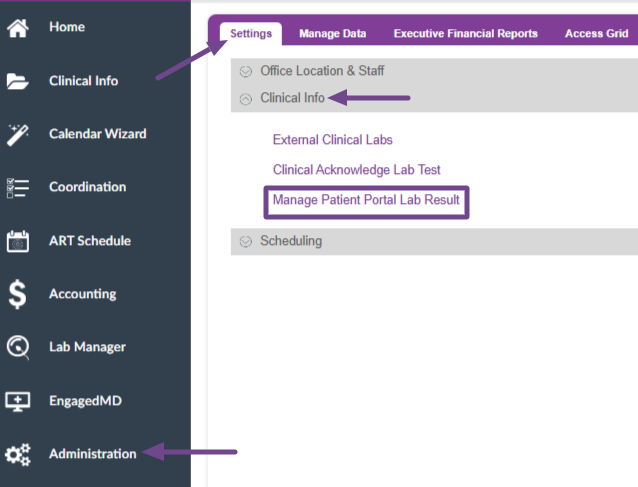
Go to Administration, the Gear icon, in the left hand tools. Select Settings>Clinical Info and click on Manage Patient Portal Lab Result.
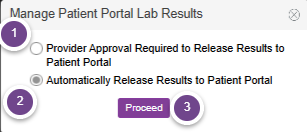
On the next screen, you will have a couple of choices.
- Provider Approval Required to Release Results to Patient Portal- This will be selected by default when your Artisan instance is initially created. This will require the provider to publish all lab results to the patients portal.
- Automatically Release Results to Patient Portal- Select this to bypass the requirement for physician signoff and automatically publish all lab results to the patient portal.
-In-House Labs- These will be released after results are acknowledged by the lab and released to the chart
-External Labs- These will be released to the patient portal as soon as they are received from Change Healthcare - Once you have selected one of the above options, select Proceed.
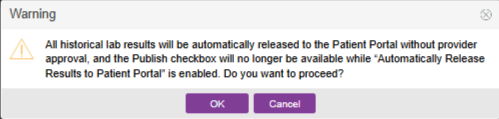
If you select the option to automatically release results to the patient portal, you will receive a warning indicating all historical lab results will automatically be released to the patient portal without physician approval. It will also provide the information that the Publish checkbox will no longer be available when the provider is signing off. Click Cancel to go back to the previous screen. Click OK to proceed.
The automatic publishing of patient lab results is now enabled.

